Features Both Have
View as MarkdownDex and Temporal both have the features on this page. Some work differently, and some work alike.
Features that work differently
| Feature | Temporal | Dex |
|---|---|---|
| Identity | Workflow ID and Run ID. Each Reset and each Continue-As-New starts a new run with a new Run ID, so the Run ID changes during one process. Temporal's docs: "you shouldn't rely on the current Run Id in your code to make logical choices" (Workflow Id and Run Id). | Flow ID and Run ID. Time Travel keeps the Run ID, and a Flow needs no Continue-As-New, so one Run ID identifies the run for its lifetime. |
| Streaming | Workflow Streams publishes through Signals, which are recorded in the Event History. Durable, and it adds to the history. | Stream messages stay in Dex Server memory, outside the run's history. Best effort. All runs of a Flow type share one capacity per Stream. |
| Going back to an earlier point | Reset terminates the current run and starts a new run at a Workflow Task event. | Time Travel moves the same run back to a Step, with a new run attempt. |
| Child processes | A Child Workflow does not carry over when its parent uses Continue-As-New. | A parent Flow keeps its SubFlow waits in one run. |
| Synchronous calls | An Update, with 10 in-flight and 2,000 total per Workflow Execution. | An RPC, with no per-Flow in-flight limit and no per-run total. |
| Messages | A Signal, with 10,000 per Workflow Execution. | A Channel message, with no total per run. |
| Long-running work | The Activity code sends each Heartbeat. | A Stream message counts as a heartbeat. |
Time Travel and Reset
| Temporal | Dex |
|---|---|
| "In all cases the current run will be terminated and a new run started." The new run has a new Run ID (API). | The same run goes back to the point. The Run ID stays, and the run attempt number increases. |
| The reset point is a Workflow Task event: completed, timed out, failed, or started. A reset type can also pick FirstWorkflowTask, LastWorkflowTask, LastContinuedAsNew, or BuildId (CLI). | The point is a Step type, a Step execution, a history event time, an event ID, or the beginning. In Dex Web, Time travel from here… on an event selects it. |
| The new run replays the kept history prefix, so the Workflow code must stay compatible with it (CLI). | Attributes, Channel messages, and waiting Steps are restored as they were at the point. |
| Before Temporal Server 1.27.1 (2025-02-26), a reset to a point between a child's start and completion was not supported. Since 1.27.1, the parent reconnects to the running child after such a reset (v1.27.1). The 1.28.0 notes (2025-06-27) add that a reset to a point before the child started gives a new run that does not reference the child (v1.28.0). | sub_flow_reset_policy sets what happens to each SubFlow wait that a Time Travel restores: attach it to the existing child, restart the child, fail the wait, or reject the Time Travel. Its six policies include ATTACH_ELSE_RESTART (the default), ATTACH_ELSE_FAIL, ATTACH_ELSE_REJECT, and ALWAYS_RESTART (SubFlows across a time travel). |
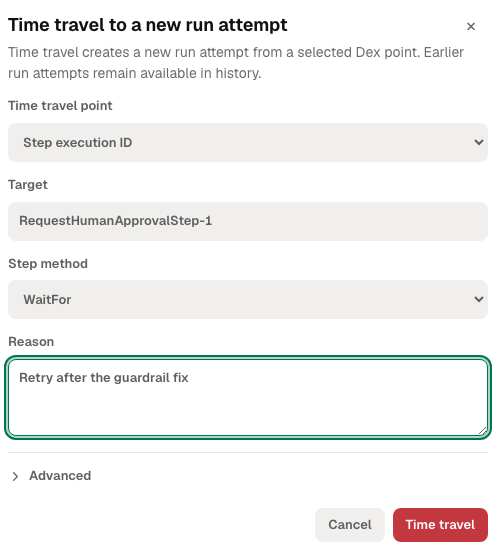
Use Time Travel after you deploy a fix for a Step that failed. Every Step after the point runs again, so each external call needs an idempotency key. See Recover a Flow with Time Travel.
SubFlow and Child Workflow
| Temporal | Dex |
|---|---|
| "Child Workflows do not carry over when the Parent uses Continue-As-New." (Child Workflows) | A parent Flow needs no new run for history size, so its SubFlow waits stay in one run. See The history limit. |
| "A single Parent should not spawn more than 1,000 Child Workflow Executions." (Child Workflows) A self-hosted service allows 2,000 pending Child Workflows per Workflow Execution by default (Defaults). | A long-lived parent keeps a pool of Steps that start SubFlows while it accepts more requests (Advanced: Long-lived Parent). |
| "The Parent can optionally await on the result of the Child Workflow Execution." (Child Workflows) | A Step starts the SubFlow in WaitFor and reads its result in Execute. |
| A Child Workflow takes a Workflow ID Reuse Policy, like any Workflow Execution. | SubFlowReusePolicy sets what a parent does when the SubFlow ID it starts already exists: ATTACH, RESTART_IF_PREVIOUS_EXITS_ABNORMALLY (the default), or ALWAYS_RESTART. The default keeps waiting for a running child, uses a completed child's result, and restarts a child that ended abnormally (SubFlowReusePolicy). |
A SubFlow is a normal Flow with its own Steps, Attributes, and Channels. See SubFlow.
RPC and Update
| Temporal | Dex |
|---|---|
| "A single Workflow Execution can have a maximum of 10 in-flight Updates and 2000 total Updates in History." (Temporal Cloud limits) | An RPC has no per-Flow in-flight limit and no per-run total. |
| An accepted Update adds an entry to the Workflow Event History (Message passing). | An RPC saves its Attribute writes with its result, not as history that forces a new run. |
| An Update waits for the Worker running the Workflow to acknowledge the request (Message passing). | An RPC runs on a Worker, like a Step. |
An RPC handler can read and write Attributes, publish to a Channel, and start new Steps. See RPC.
Channel and Signal
| Temporal | Dex |
|---|---|
| "A single Workflow Execution may receive up to 10,000 Signals. After that limit is reached, no more Signals will be processed for that Workflow Execution." (Temporal Cloud limits) | A Channel has no total message limit per run. |
| A Client sends a Signal without depending on the Worker being available (Message passing). | PublishToChannel stores a message with no Worker online. |
| The SDKs generate a request ID that deduplicates a retried client call. For your own key, "you should use a custom idempotency key that you send as part of your own signal inputs, implementing the deduplication in your Workflow code" (Handling messages). | An RPC that publishes to a Channel takes a request ID from the caller. When every attempt passes the same request ID, Dex saves the publication at most once (RPC request IDs). |
| Each Signal is recorded in the Workflow's persistent history (Workflow Streams). | A long run of messages needs no new run. See The history limit. |
A Channel is a durable first-in, first-out queue inside one Flow run. A Step consumes its messages by waiting on it in WaitFor. See Channel.
Stream and Workflow Streams
| Temporal | Dex |
|---|---|
| Workflow Streams is in Public Preview for Python and TypeScript, announced 2026-06-17 (Workflow Streams). | Stream is a built-in primitive in the Go, Python, Java, TypeScript, and Rust SDKs. |
| It is a library on top of Workflows, Signals, Updates, and Queries. The Workflow keeps the list of stream events (Workflow Streams). | Dex Server keeps Stream messages in memory, outside the run's history, and they do not count against the run's state. A Stream's capacity is set per Flow type and Stream name, and all runs of that Flow type share it. |
| Its Signals are recorded in history like any other Signal; see Channel and Signal. | A Step or a Client writes messages. A reader reads them in order and resumes where it stopped. Delivery is best effort. |
Use a Stream for live progress, such as generated-text chunks. Use a Channel or an Attribute for data that must not be lost. See Stream.
Long-running Step and Activity
| Temporal | Dex |
|---|---|
| A long-running Activity sends Heartbeats. A Heartbeat Timeout is the maximum time between them (Detecting Activity failures). | A long-running Step method sends heartbeats. Dex times out an attempt that sends none within HeartbeatTimeout. |
| A Heartbeat can carry details, and a retried Activity reads the details of the last Heartbeat (Activity Heartbeats). | A heartbeat can carry a checkpoint value, and the next attempt receives the latest stored checkpoint. |
| The Activity code calls the Heartbeat API for each Heartbeat. | A Stream message counts as a heartbeat. A Step that writes its progress to a Stream needs no separate heartbeat call. |
See Heartbeat.
Features that work alike
The terms map lists every pair.
| Feature | Temporal | Dex |
|---|---|---|
| ID reuse | Workflow ID Conflict Policy for an open ID, Workflow ID Reuse Policy for a closed one | One ID reuse policy for open and closed Flow IDs |
| Durable timers | Timer, sleep | Timer in a Step's WaitFor |
| Retries and timeouts | A retry policy and timeouts on each Activity | A retry policy and timeouts on each Step method, with the same default backoff |
| Routing | Task Queue | Task queue, with routing by Flow type inside it |
| Search | Search Attributes | Indexed Attributes |
| Cancellation | Cancellation of a Workflow or an Activity | An RPC cancels Steps by Step type, and StopFlow stops the Flow |
| Workers | Workers in your process poll the Temporal Service | Workers in your process poll Dex Server |
Next
- Programming Model: writing and changing the same process in both engines.
- Operations: running the server, the history limit, and data size.