Features Only in Dex
View as MarkdownThese ten features come with Dex, in Dex Web, dexcli, the SDKs, and Dex Server. For each one, the table gives the workaround in Temporal.
| Feature | Dex | Workarounds in Temporal |
|---|---|---|
| Flow design | dexcli visualize draws a Flow's Steps and transitions from source, and Dex Web shows the graph. | The Web UI shows each Workflow Execution's Event History in Timeline, All, Compact, and JSON views, with no graph of the Workflow Definition (Web UI). |
| Generated forms | Dex Web builds start forms, Actions, Summary and Display fields, and the Work Queue from the Flow's definition. | Build your own forms and pages on the Temporal Client. The Web UI lists and shows Workflow Executions (Web UI). |
| Clone fork | Copies a run's state at one point into a new Flow, and the source run keeps running. | Reset: "In all cases the current run will be terminated and a new run started." (API) |
| Connectors | Released Connectors give a Flow ready-made Steps and Triggers for external providers. | The integrations page lists agent frameworks, model providers, frameworks, and observability tools, not ready-made Activities or triggers for third-party services (Integrations). |
| Skip a Timer | SkipTimer makes one waiting Timer of a running Flow ready at once. | A Timer resolves when its duration has passed (Timers), and the SDK test server skips time in tests (Testing suite). |
| Wait for a Step | A Client call returns when one Step execution completes, while the Flow keeps running. | An Update whose handler is Workflow code that waits on a condition and runs on a Worker (Message passing). |
| Wait for an Attribute | A Client call returns when an Attribute's value matches a typed comparison. | The same Update with a handler that waits on a condition (Message passing). |
| Server-side reads | Dex Server answers GetAttributes itself, so the read works while no Worker runs. | A Query calls into its Query handler, which runs on a Worker (Sending messages). |
| Attribute Store sync | Dex Server writes selected Attributes to PostgreSQL tables you own. | Write the data to your own database from an Activity. |
| Hard-delete Attributes | The value lives only in object storage, and deleting it removes it for good. | Keep the value in your own store, and pass a reference through the Workflow. |
Flow design from source
dexcli visualize reads one Flow source file and builds its Flow Definition Graph without running the code. It reads Go, Python, TypeScript, Java, and Rust. Dex Web draws the graph on the Designs page and in each run's Design view. A Step card shows who acts at that Step, such as a person, a Timer, or the Flow itself.
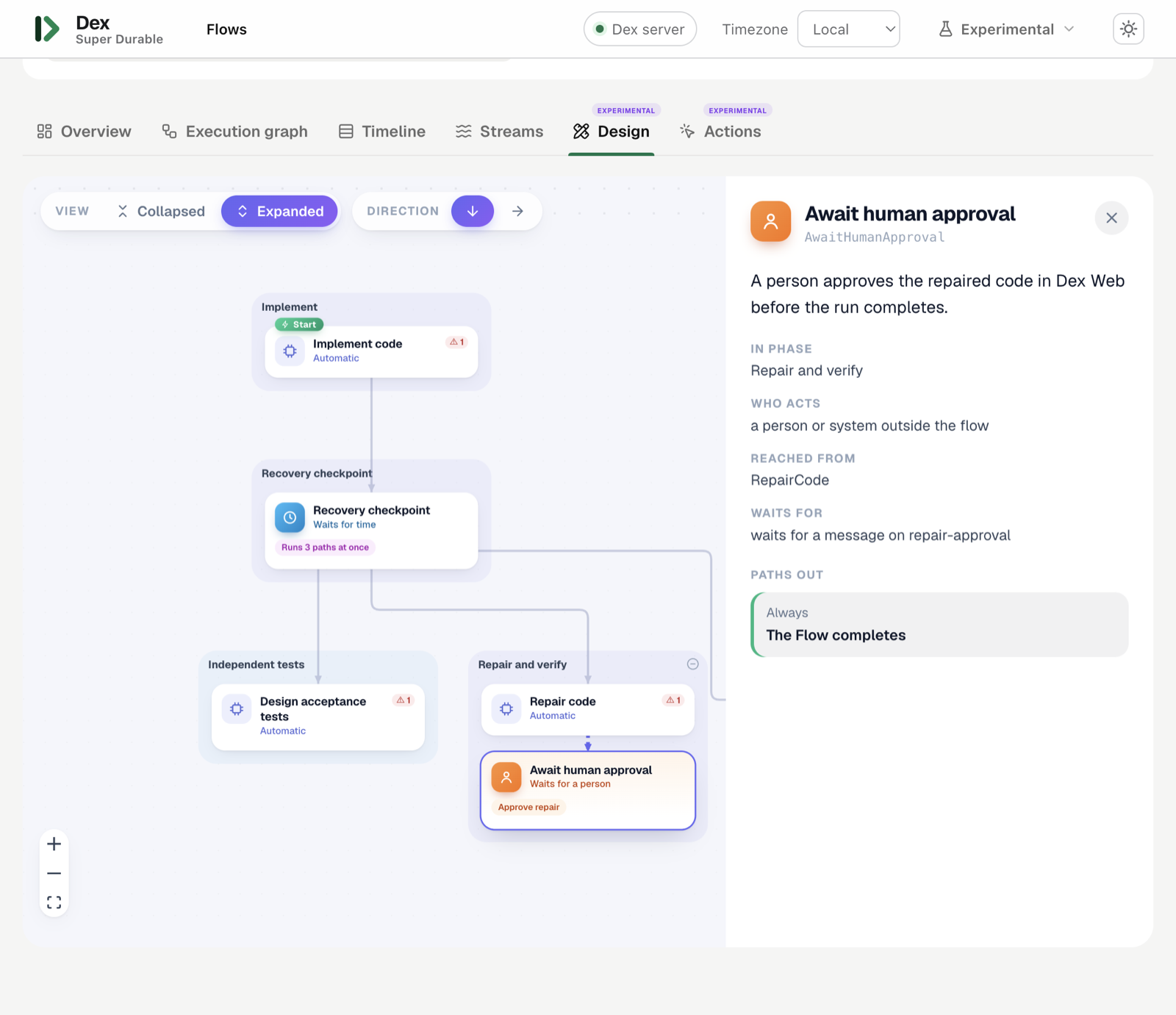
See Flow source visualization.
Generated forms and Actions
Dex Web reads the same Flow Definition Graph. From it, Dex Web renders the Start Flow form, an Actions form for each RPC that declares an Action, and the Summary and Display fields of each run. The Work Queue lists the runs of one Flow type with those fields. Working as picks a permission and shows the runs whose Actions it may use.
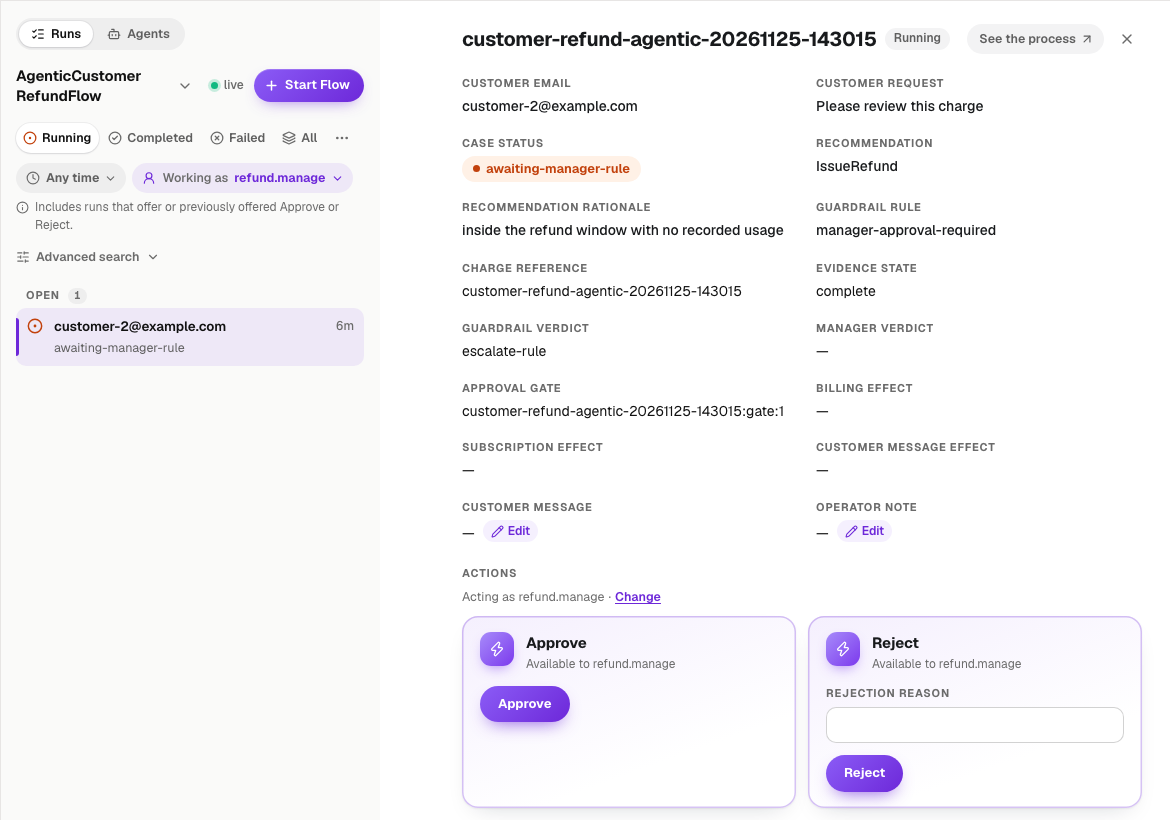
See Dex Web.
Clone fork
Clone fork gives the new Flow its own Flow ID and copies Attributes, pending Channel messages, and waiting Steps. The new Flow starts a history of its own. A common use is to branch an agent session while the original session continues. Start it from Dex Web with Clone fork from here… on an event, from a Client with CloneForkFlow, or with dexcli flow clone-fork.
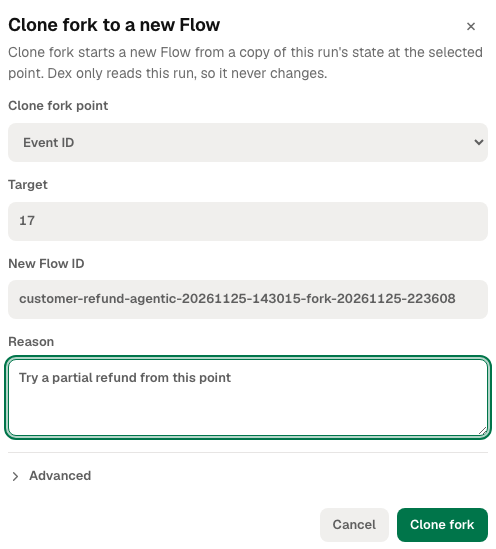
See Branch a Flow with Clone Fork.
Connectors
A Connector gives a Flow Steps that call an external provider, and Triggers that turn provider events into Flow starts or RPC calls. A Mutation sends the same idempotency key on every retry and handles a call whose outcome is unknown. Dex Web Connectors shows each connection and the setup it needs. Browse released Connectors in the Connector catalog.
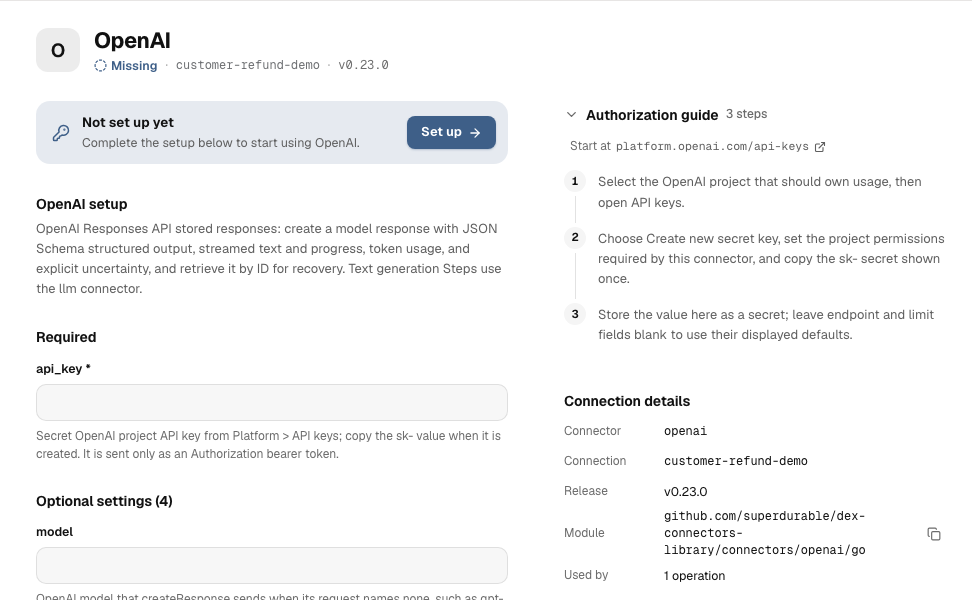
See Connector.
Skip a Timer
SkipTimer selects one Timer by Flow ID, Step execution, and the Timer's condition ID or index. The waiting Step continues as if the Timer had fired. Use it in tests, or in production to run a waiting Step early. The Go, Python, Java, TypeScript, and Rust Clients have it, and so does dexcli flow skip-timer.
See Skip a Timer.
Wait for a Step
WaitForStepCompletion returns when one Step execution of a Flow completes. Later Steps keep running after the caller has its answer. A typical caller starts a Flow, waits for the Step that saves a record, and then answers its HTTP request. Python and Rust name it wait_for_step_completion, and Java and TypeScript name it waitForStepCompletion.
Wait for an Attribute match
WaitForAttributeMatch returns when an Attribute satisfies a typed comparison, and returns the matched value. A common choice is a revision Attribute that every state change increments. The caller waits until the revision is greater than the last value it saw, then reads the new state.
Server-side Attribute reads
GetAttributes reads any mix of Attributes and AttributeMap instances in one request. All values come from the same committed state. The read dispatches nothing to a Worker and uses no Worker capacity.
See Read Attributes from outside a Flow.
Attribute Store sync
A Flow marks an Attribute for sync and names a configured store in its FlowConfig. Dex Server then writes the Attribute to that store's tables in the background, in batches. A row holds the latest values for one Flow ID. Your own services and reports read the tables with SQL.
See Attribute Store sync.
Hard-delete Attributes
Dex stores every value of a hard-delete Attribute only in object storage, and Flow history keeps a reference. Deleting the Attribute, or setting it to null, deletes the stored value permanently. After that, neither Dex APIs nor Flow history can recover it. Use it for values such as an API key.
Next
- Features Both Have: Time Travel and Reset, SubFlow and Child Workflow, RPC, Channel, and Stream.
- Dex vs. Temporal: the overview and the terms map.