Programming Model
View as MarkdownTemporal replays Workflow code against its Event History, so new code must produce the same commands for runs that are already open. A Dex Flow is a set of Steps, and each Step runs the code of the Worker that takes it.
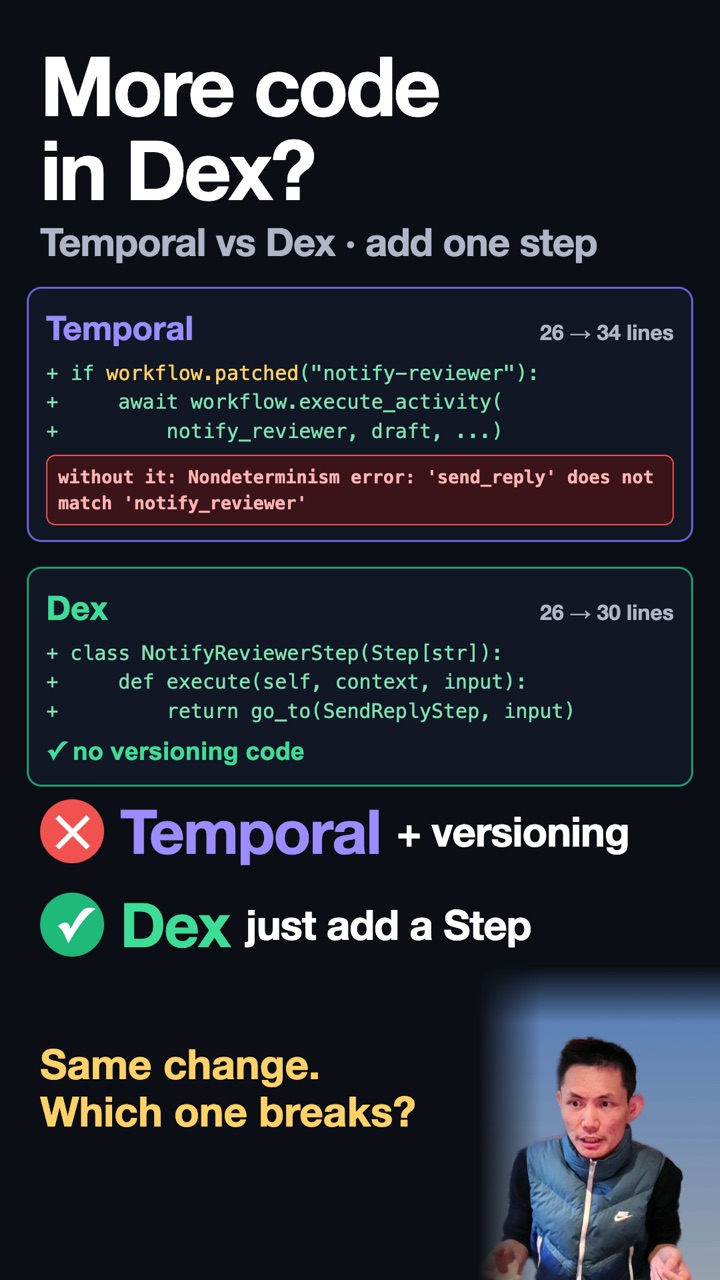
Lines of code
The agent-reply example drafts a reply, waits for a human to approve it, and sends it. Version 2 adds a step after the draft that notifies the reviewer. The table counts the lines of each flow definition file, without blank and comment lines.
| Temporal | Dex | |
|---|---|---|
Version 1, flow_v1.py | 26 | 26 |
Version 2, flow_v2.py | 34 | 30 |
| Change from version 1 to 2 | 8 lines added | 6 lines added, 2 removed |
The Temporal change adds the notify_reviewer Activity and guards it with workflow.patched. Without the guard, open runs fail, as shown below. See flow_v2.py.
+@activity.defn
+async def notify_reviewer(draft: str) -> str:
+    return f"reviewer notified: {draft}"
+
+
 @activity.defn
 async def send_reply(draft: str) -> str:
@@
         draft = await workflow.execute_activity(
             draft_reply, ticket,
             start_to_close_timeout=timedelta(seconds=10),
         )
+        if workflow.patched("notify-reviewer"):
+            await workflow.execute_activity(
+                notify_reviewer, draft,
+                start_to_close_timeout=timedelta(seconds=10),
+            )
         await workflow.wait_condition(lambda: self.approved)
The Dex change adds NotifyReviewerStep and points DraftReplyStep to it. It has no versioning code. See flow_v2.py.
 class DraftReplyStep(Step[str]):
     def execute(self, context: Context, input: str) -> StepDecision:
-        return go_to(SendReplyStep, f"draft reply for {input}")
+        return go_to(NotifyReviewerStep, f"draft reply for {input}")
+
+
+class NotifyReviewerStep(Step[str]):
+    def execute(self, context: Context, input: str) -> StepDecision:
+        return go_to(SendReplyStep, input)
@@
         self.draft_reply = DraftReplyStep()
+        self.notify_reviewer = NotifyReviewerStep()
         self.send_reply = SendReplyStep()
@@
         return StepList.start_step(self.draft_reply).other_steps(
-            self.send_reply
+            self.notify_reviewer, self.send_reply
         )
The demo started replies on version 1, stopped that Worker, and deployed version 2. On Temporal, this run used version 2 without workflow.patched.
| Reply at the deploy | Temporal | Dex |
|---|---|---|
| Approved, sending the reply, and retrying it | The next Workflow Task fails with a nondeterminism error. The run stays Running. | Completes. |
| Waiting for approval | Completes, and notifies the reviewer after the approval. | Completes without NotifyReviewerStep. |
| Completed | temporal workflow stack fails with the same error. | Reading the result works, with or without a Worker. |
The error on Temporal:
[TMPRL1100] Nondeterminism error: Activity type of scheduled event 'send_reply' does not match activity type of activity command 'notify_reviewer'
With workflow.patched, the approved Temporal runs complete too. The demo repository lists the versions used for these results.
The scenario
The rest of this page follows Episode 1. An AI support agent answers a customer. One Temporal workflow or one Dex Flow runs per conversation.
- The conversation starts with the customer's first message.
- Each customer message gets one AI reply.
- After a reply, a 10-minute idle timer starts. A follow-up message is answered, and the timer starts again after that reply.
- If the customer sends nothing for 10 minutes, the application sends a nudge email. One hour after the nudge with no message, the conversation closes.
The demos use 30 seconds in place of 10 minutes. In the timer demo, the first message arrives at second 0 and a follow-up at second 20. The nudge is due 30 seconds after the second reply, at second 50.
The natural Temporal code
This is one direct way to write the timer. The Signal handler replies to the message and sets a nudge_at field. The main function sleeps until nudge_at, then sends the nudge. See naive_conversation_workflow.py.
A real run
The nudge goes out at second 30. The run reports no error and raises no alert.
| Implementation | Nudge sent at | Errors |
|---|---|---|
Temporal, NaiveConversationWorkflow | 30.0 s | none |
Temporal, ConversationWorkflow | 50.0 s | none |
Dex, SupportConversationFlow | 50.4 s | none |
Why the timer fires early
Temporal runs workflow code as workflow tasks. The Worker completes each workflow task with commands: "A Command is an action a Worker requests from the Temporal Service when it completes a Workflow Task Execution."
A timer is one of those commands. The call to sleep sends a StartTimer command, and the server records the timer with the first value of nudge_at. The Signal handler later changes nudge_at. Changing a variable sends no command. So the first timer still fires at second 30.
The code is valid Python, and the Timer fired as scheduled. The code does not show which statements become commands, or when.
The correct Temporal code
The correct workflow follows the official updatable timer sample. It gets five things right:
- The Signal handler only puts the message in a queue. It does no work.
- The main function is a loop.
- Each pass answers every queued message, in order.
workflow.wait_conditionwith a timeout waits for a new message or the end of the idle window.- The timeout raises
asyncio.TimeoutError, which the code catches.
The Dex Flow
A Step says what it waits for and where it goes next. WaitForCustomerStep waits for any of two conditions: a message on the CustomerMessages Channel, or a Timer for the idle window. If the Timer fired, the Flow moves to NudgeCustomerStep. Otherwise it moves to GenerateReplyStep, which replies and moves back to WaitForCustomerStep. Each time WaitForCustomerStep starts, it starts a new Timer. The post_message RPC publishes each customer message to the Channel. See flow.py.
The Idle Timer pattern has the same shape in every SDK. Notice the two conditions in WaitFor and the decision in Execute, which moves the Step to itself on activity:
class Tracker(Step[None]):
    def __init__(
        self,
        process_inactiveness: ProcessInactiveness,
        active_channel: Channel[None],
    ) -> None:
        self.process_inactiveness = process_inactiveness
        self.active_channel = active_channel

    def wait_for(self, context: Context, input: None) -> Wait:
        return Wait.any_of(
            Timer.by_duration(TRACKER_DURATION),
            self.active_channel.for_one(),
        )

    def execute(self, context: Context, input: None) -> StepDecision:
        if context.has_timer_fired():
            return go_to(ProcessInactiveness, None)
        return go_to(Tracker, None)
Example: examples/python/dex_examples/patterns/inactiveness-tracker-timer/inactiveness_tracker_flow.py
type trackerStep struct {
	dex.StepDefaults
}

func (trackerStep) WaitFor(
	ctx dex.Context,
	_ dex.None,
) (*dex.Wait, error) {
	return dex.AnyOf(
		dex.Timer(TrackerDuration),
		ActiveChannel.ForOne(),
	), nil
}

func (trackerStep) Execute(
	ctx dex.Context,
	_ dex.None,
) (*dex.StepDecision, error) {
	if ctx.HasTimerFired() {
		return dex.GoTo(processInactiveness{}, nil), nil
	}
	return dex.GoTo(trackerStep{}, nil), nil
}
Example: examples/go/patterns/inactiveness-tracker-timer/workflow.go
final class Tracker implements Step<Void> {
    @Override
    public Class<Void> getInputType() {
        return Void.class;
    }

    @Override
    public Wait waitFor(final Context context, final Void input) {
        return Wait.anyOf(
                Timer.byDuration(TRACKER_DURATION),
                activeChannel.forOne());
    }

    @Override
    public StepDecision execute(final Context context, final Void input) {
        if (context.hasTimerFired()) {
            return StepDecision.goTo(ProcessInactiveness.class, null);
        }
        return StepDecision.goTo(Tracker.class, null);
    }
}
class Tracker implements Step<void> {
  public getStepType(): string {
    return "Tracker";
  }

  public waitFor(_context: Context, _input: void): Wait {
    return Wait.anyOf(
      Timer.byDuration(TRACKER_DURATION_MS),
      activeChannel.forOne(),
    );
  }

  public execute(context: Context, _input: void): StepDecision {
    if (context.hasTimerFired()) {
      return goTo(ProcessInactiveness, undefined);
    }
    return goTo(Tracker, undefined);
  }
}
Example: examples/typescript/src/patterns/inactiveness-tracker-timer/inactiveness-tracker-flow.ts
#[derive(Default)]
struct Tracker;

impl Step for Tracker {
    type Input = ();

    fn wait_for(&self, _context: &mut Context, _input: ()) -> HandlerResult<Wait> {
        Ok(Wait::any_of([
            Timer::by_duration(Duration::from_secs(300)),
            ACTIVE_CHANNEL.for_one(),
        ]))
    }

    fn execute(&self, context: &mut Context, _input: ()) -> HandlerResult<StepDecision> {
        if context.has_any_timer_fired() {
            return Ok(StepDecision::go_to(&ProcessInactiveness, ()));
        }
        Ok(StepDecision::go_to(&Tracker, ()))
    }
}
Example: examples/rust/src/patterns/inactiveness_tracker/flow.rs
The Step has one wait and one decision. The Timer and the Channel are the same Wait, so the code needs no queue, loop, or caught exception.
Changing the code
A new requirement arrives while conversations are open: analyze the sentiment of each customer message before replying.
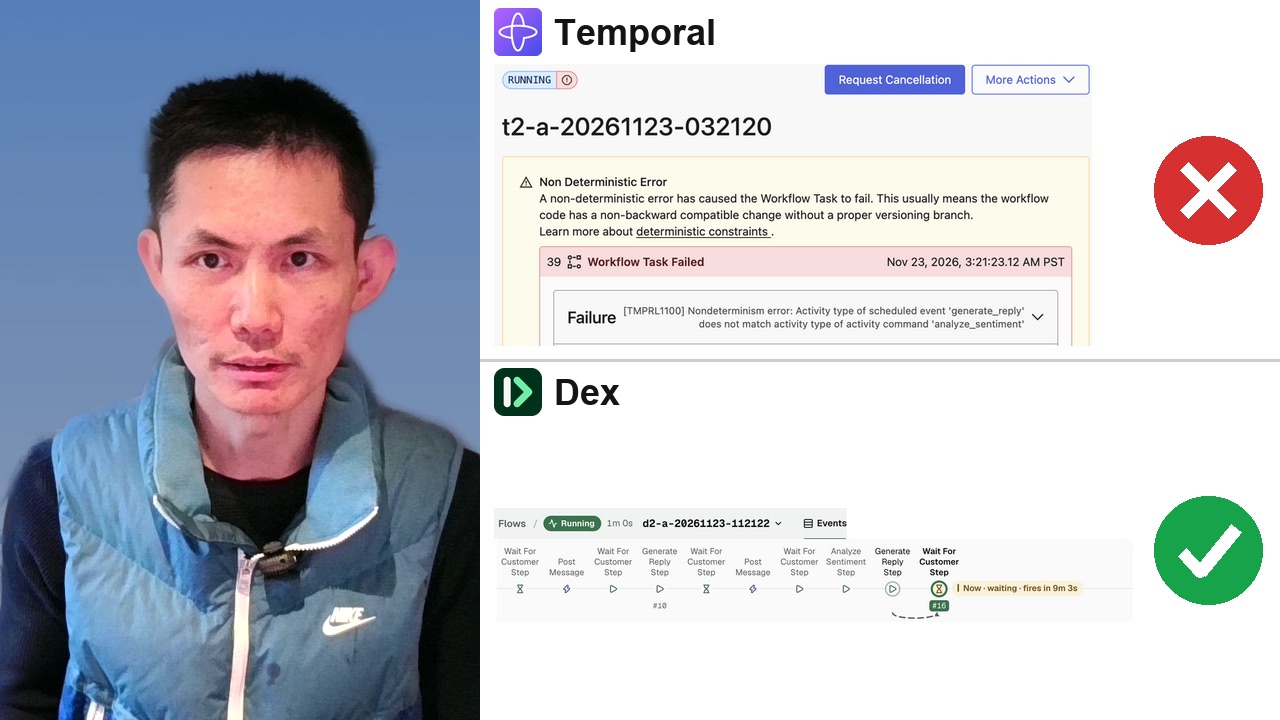
Temporal. Version 2 runs an analyze_sentiment activity before generate_reply. Conversation A started on version 1. After the deploy, its next message is accepted and never answered. The workflow task fails and is retried, and the run stays open:
[TMPRL1100] Nondeterminism error: Activity type of scheduled event 'generate_reply' does not match activity type of activity command 'analyze_sentiment'
Queries to conversation A fail too. A conversation started on version 2 works. Temporal documents two fixes:
- Patching. Guard the new code with
workflow.patched. Temporal describes three steps. First, patch in the new code and run it alongside the old code. Second, remove the old code and mark the patch withdeprecate_patch(). Third, removedeprecate_patch()once no open Workflow Execution runs the previous version of the code. For the second and third steps, Temporal also says to wait until the Workflows started with the pre-patch code "have left retention". In the demo, version 3 withworkflow.patchedlet conversation A recover without a reset. Conversation A never runs the sentiment activity, because its history has no patch marker. In the demo, conversation B had started on the unguarded version 2. On version 3, it failed with the mirrored non-determinism error. - Worker Versioning. "A Pinned Workflow is guaranteed to complete on a single Worker Deployment Version." Other versions can keep polling "to allow pinned Workflows to finish executing". An Auto-Upgrade Workflow moves to its target version, which is the Current Version or the Ramping Version of its Task Queue. Auto-Upgrade Workflows "need to be kept replay-safe manually", with patching.
Dex. Version 2 adds AnalyzeSentimentStep. WaitForCustomerStep and WaitAfterNudgeStep now move to it instead of GenerateReplyStep. See flow_v2.py.
- Conversation A was waiting in
WaitForCustomerStep, which a version 1 Worker had started. After the deploy, a version 2 Worker handled its next message. The message went throughAnalyzeSentimentStep, then got its reply. - A conversation started on version 2 begins at
AnalyzeSentimentStep. - A wait that started before the deploy keeps its Timer. In a variation that also shortens the idle window, the old 60-second Timer fired at 60.1 seconds. The next wait used the new 10-second window.
Deploy Code Changes covers what a deploy changes for open Flows and how to keep them working.
The complete code
| Temporal | Dex | |
|---|---|---|
| Program | conversation_workflow_inline_transcript.py and activities.py | flow.py |
| Post a customer message | Signal post_message | RPC post_message, which publishes to a Channel |
| Assign an agent | Update assign_agent | RPC assign_agent |
| Read the transcript | Query get_transcript_page | RPC get_transcript_page |
| Control flow | Implicit in the workflow tasks that the code produces | Explicit Steps and transitions |
Because the transitions are explicit, Dex draws the Flow design from the source code. dexcli visualize produces the graph, and Dex Web draws it. A run's page in Dex Web shows the Step that the conversation waits in. The demo's flow-definitions folder holds the graphs of its Flow versions. This is the graph of the Idle Timer pattern above:
Flow visualization describes the analyzer and the canvas.
Run it yourself
The demo needs uv, the temporal CLI, and dexcli. Each script starts its own server and prints its results. Both servers run in their local development mode with default limits. The AI reply and the sentiment analysis are local mocks, not a real model.
The Episode 1 scripts are in the scripts folder, with their versions used. The reply-with-approval scripts are in the agent-reply folder and also need python3.
Every script except d-design.sh stops what it started. d-design.sh keeps Dex running after a successful run, because its default is KEEP=1. Stop it with scripts/dex/stop.sh, or start the script with KEEP=0.
| Topic | Temporal | Dex |
|---|---|---|
| Reply with approval, version 1 and 2 | agent-reply/temporal/run.sh, upgrade.sh, upgrade-in-send.sh, query-completed.sh | agent-reply/dex/run.sh, upgrade.sh, upgrade-in-send.sh, read-completed.sh |
| The idle timer | scripts/temporal/t1-naive-timer.sh | scripts/dex/d1-timer.sh |
| Changing the code | scripts/temporal/t2-change-code.sh, scripts/temporal/t2-patch-fix.sh | scripts/dex/d2-change-code.sh, scripts/dex/d2-idle-window-variation.sh |
| The history limit | scripts/temporal/t5-flood.sh, scripts/temporal/t6-continue-as-new.sh | scripts/dex/d5-flood-fair.sh |
| External Storage | EXTERNAL_STORAGE=1 scripts/temporal/t6-continue-as-new.sh | |
| Context in each activity, transcript budget | scripts/temporal/t8-context-in-activity.sh | scripts/dex/d7-transcript-budget.sh |
| The Flow design | scripts/dex/d-design.sh |
Episode 1
Episode 1 is the full walkthrough of this page's support conversation: the idle timer, the code change, and the conversation that keeps going.
Next
- Dex vs. Temporal: the summary table and the terms map.
- Deploy Code Changes: how open Flows meet new code.