Operations
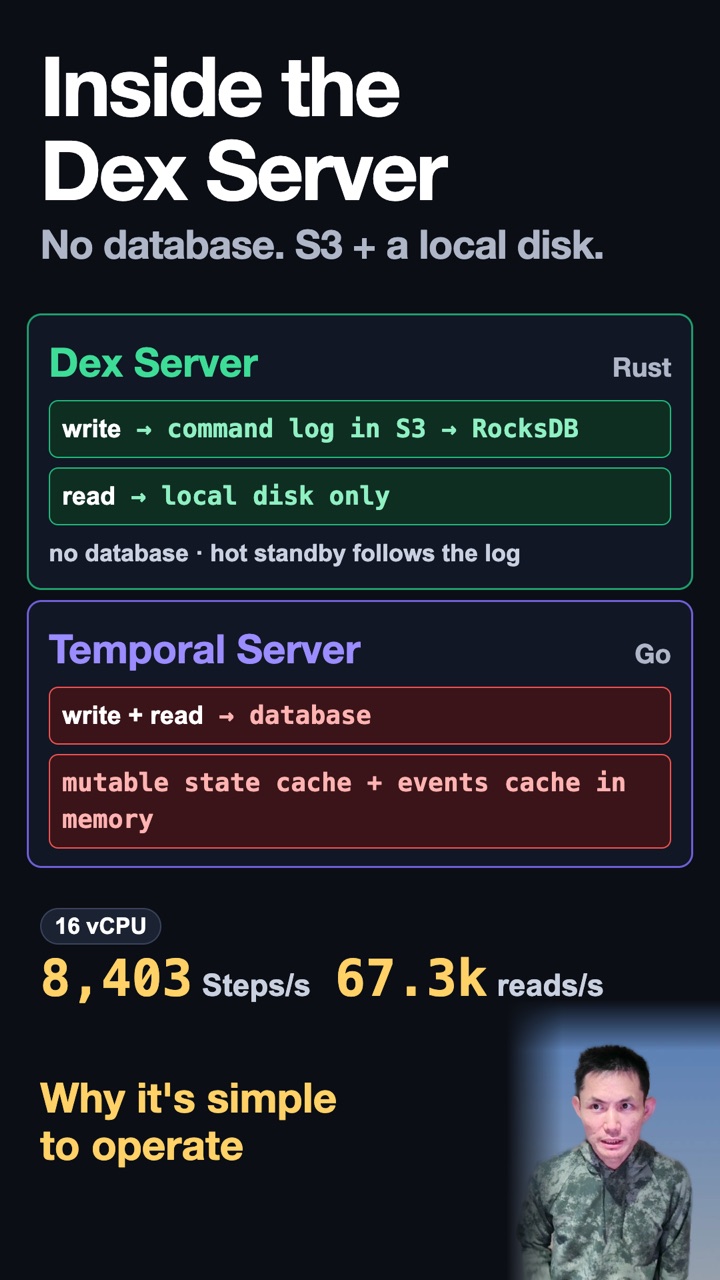
View as MarkdownA self-hosted Temporal Service runs four services on a database, and Temporal applications size Worker caches and code around per-execution limits. Dex Server is one binary on object storage or db9, and a Flow run needs no new run when its history grows.
Run the server
| Temporal Service | Dex Server | |
|---|---|---|
| Processes | Frontend, History, Matching, and Worker services. They can share a process. Temporal recommends separate processes in production. | One binary. One active node holds a lease in object storage. See Dex Server. |
| Required storage | A database: Cassandra, MySQL, or PostgreSQL. SQLite for development and testing only. | Object storage: Amazon S3, Google Cloud Storage, Azure Blob Storage, Aliyun OSS, Tencent COS, or an S3-compatible store such as MinIO. db9 can take its place. |
| Search storage | A Visibility store: Elasticsearch, OpenSearch, MySQL, PostgreSQL, or SQLite. Temporal recommends Elasticsearch in production. Custom Search Attributes are not supported on Cassandra. | Built in by default. PostgreSQL or ParadeDB optional. |
The Temporal facts come from Temporal Server, Persistence, Visibility, and the production checklist.
A Dex standby node takes over after the active node's lease ends, 10 seconds by default. See Failover and Deploys.
Limits
| Item | Temporal | Dex |
|---|---|---|
| Worker cache | The cache limit is a count of Workflow Executions (Worker tuning reference). You find a size that fits Worker memory by trial. See Worker memory. | A Worker keeps no Workflow cache. Its blob cache for large values has a byte limit. |
| History size | 51,200 events or 50 MB per Workflow Execution, with a warning at 10,240 events or 10 MB (limits). Fixed on Temporal Cloud, a configurable default on a self-hosted server. | A window of each run's newest events. Older events are pruned, and the Flow keeps running. See Dex. |
| Continue-As-New | Application code that hands the state to a new run before the history limit. See Continue-As-New. | A Flow needs no new run for history size. |
| Payload size | 2 MB per payload and 4 MB per gRPC message. A self-hosted server warns at 512 KB (blob size limit). An Event History transaction holds at most 4 MB on Temporal Cloud. | 16 MiB per value and 64 MiB of active state per Flow run, by default. See Data size. |
| Deploying new code | Patching APIs keep new code compatible with open runs. Worker Versioning is Generally Available since 2026-03-30 (announcement). Auto-Upgrade Workflows still need patching. | Each Step runs the code of the Worker that takes it. See Changing code. |
| Messages per execution | 10,000 Signals, 10 in-flight and 2,000 total Updates (Temporal Cloud limits), and 2,000 pending Child Workflows by default (defaults). | Channel messages and RPCs have no per-run total. See Features Both Have. |
The history limit
The demos ran a local development server with the default limits in the table above. Temporal writes the limits in MB and KB. The measured byte counts below are exact, and the payload limit the server applied was 2 MiB, 2,097,152 bytes. Every number comes from a script in the dex-vs-temporal-demo repository. The AI reply is a local mock, not a real model. The repository lists the versions used.
The conversation that keeps going
The load test sends follow-up messages at 8 per second, about 200 bytes each, and gets one AI reply per message. The workflow has no Continue-As-New.
- 4,266 follow-up messages were accepted and answered in 533 seconds. The 4,267th was rejected:
workflow execution already completed. - The server terminated the workflow at 51,201 history events:
Workflow history count exceeds limit.The history size was 9 MB, far below 50 MB. - Each customer message adds 12 history events: 1 Signal, 2 workflow tasks of 3 events each, 1 activity of 3 events, 1 timer canceled, and 1 timer started.
Continue-As-New
Continue-As-New ends the run and starts a new one with fresh history. The new run keeps the Workflow ID and gets a new Run ID. The workflow code does this itself:
- Check
workflow.info().is_continue_as_new_suggested(). - Wait until every Signal and Update handler has finished. Temporal's guidance: "Complete all handlers before using Continue-as-New."
- Take a snapshot of the state: the transcript, every unanswered message, the agent, the status, and the timer deadline.
- Pass the snapshot as the next run's input, and restore the state from it in the new run.
The demo's conversation_workflow_inline_transcript.py does this in 249 lines. The workflow without Continue-As-New has 148. It chains runs at the server's suggestion, about 4,100 events per run.
The snapshot is a payload, so it is limited to 2 MB. After 3,531 answered follow-up messages, the next run's input was 2,199,782 bytes, above the 2,097,152-byte limit. The workflow task failed:
[TMPRL1103] Attempted to upload payloads with size that exceeded the error limit.
The workflow stayed Running and kept accepting Signals, and it stopped replying. The stop point moves with the timing of each Continue-As-New.
Temporal's answer for large payloads is External Storage, in Public Preview. It stores a payload outside the Event History and records a reference token in its place. With a local directory as the store, the demo answered 10,000 messages, each once. The stored objects stayed after the workflow completed. Temporal documents that it "does not automatically delete payloads from your external store".
The conversation context in each activity
ConversationWithContextWorkflow passes the whole transcript to each reply activity as a regular input, with no Continue-As-New and no External Storage. Temporal records each activity's input in its ActivityTaskScheduled event. So each reply copies the transcript into the history again, and the history grows with the square of the message count.
| Messages | Follow-up messages accepted | Terminated at |
|---|---|---|
| 200 bytes, 8 per second | 408, of which 407 were answered in 51 s | 4,907 events, 52,602,112 to 52,602,325 history bytes |
| 8 KiB, 2 per second | 109, of which 108 were answered in 54 s | 1,319 events, 52,719,073 to 52,719,369 history bytes |
Both runs ended with Workflow history size exceeds limit. The 50 MB history size limit was reached first. The 2 MB payload limit was not. No workflow task failed, and the Worker logged no error before the termination. These numbers hold for a regular activity that receives the full transcript on each call. The demo did not measure other designs.
Dex
The Dex Flow ran the same load for 30 minutes. It answered all 14,138 follow-up messages that were sent and kept running, with no backlog at the end. The load driver dropped 262 of 14,400 planned sends by back-pressure during a slow period of about three minutes.
Dex keeps a window of each run's newest events and prunes older ones, so the Flow kept running. The History window reference gives the defaults. The demo repository lists the event counts it measured.
The Flow keeps the transcript in an AttributeMap of chunks, within 32 MiB of the run's 64 MiB state budget. When an append does not fit, TrimTranscriptStep folds the oldest chunks into a summary and deletes them. With 8 KiB messages, the transcript reached 33.2 MB and stayed under the budget. 64 chunks went into the summary, and the Flow kept running.
Data size
The Temporal payload limit covers an activity input and a Continue-As-New snapshot. A Dex value is an Attribute value or a Channel message. The history and the superseded values kept for Time Travel do not count toward a Flow run's 64 MiB of active state. See Limits and Flow state budget.
Concurrency defaults
In a Temporal Python Workflow, the main function and the Signal and Update handlers run as coroutines on one thread, and they switch at each await. Temporal recommends an asyncio.Lock to protect an update that spans an await.
When a Flow has parallel branches, Dex runs their Steps in parallel, on one Worker or on several. An RPC can run alongside them. They share the Flow's Attributes. Use a lock for a read-modify-write that must run alone. Without a lock, two writers that read and then write can overwrite each other.
Next
- Features Only in Dex: Flow design, generated forms, Clone fork, Connectors, and more.
- Features Both Have: Time Travel, SubFlows, RPCs, Channels, and Streams.
- Run Dex in Production: the settings to change before launch and how to size a node.
- Performance: Worker memory and server throughput.