Dex vs. Temporal
View as MarkdownDex and Temporal both run processes that survive crashes, restarts, and long waits. Temporal replays workflow code against an Event History kept in a database, while Dex saves each Step's result and runs as one binary on object storage.
Differences at a glance
Measured numbers come from the dex-vs-temporal-demo repository and the Dex Performance page.
| Topic | Temporal | Dex |
|---|---|---|
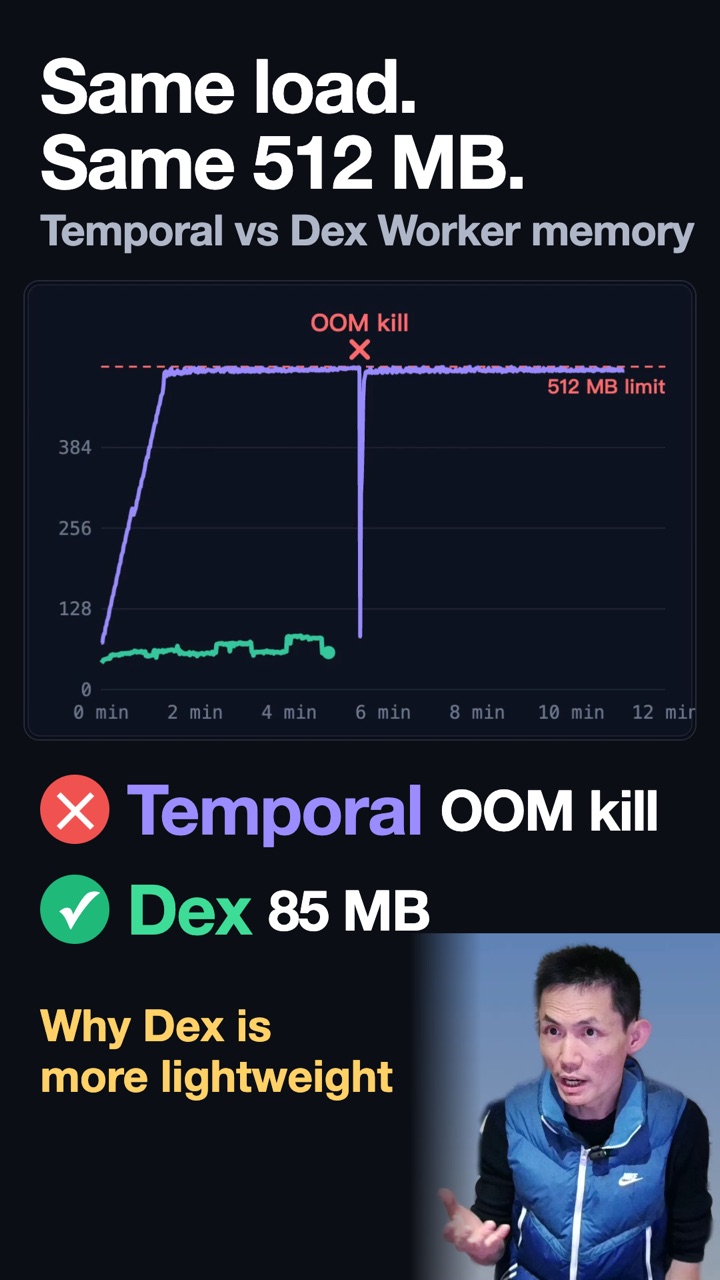
| Worker memory and CPU | In a 512 MB container, the Worker was OOM-killed, and 715 messages got no reply. With 2 GB and a cache of 50 Workflows, it peaked at 581.6 MiB and 36.3% CPU. | In 512 MB, the Worker peaked at 85.5 MiB and answered all 3,000 messages. With 2 GB, it peaked at 79.8 MiB and 17.4% CPU. |
| Server throughput | Temporal Cloud's default limit is 500 actions per second per Namespace. | One Dex Server node on S3 ran 1,772 SYNC Steps per second on 2 vCPU and 8,403 on 16 vCPU. The 16 vCPU node answered 67.3k Attribute-read RPCs per second. |
| Running the server | Frontend, History, Matching, and Worker services on Cassandra, MySQL, or PostgreSQL, plus a Visibility store. | One binary. Its only required dependency is object storage: Amazon S3, Google Cloud Storage, Azure Blob Storage, Aliyun OSS, Tencent COS, or an S3-compatible store such as MinIO. db9 can take its place. |
| Long-running processes | An Event History holds at most 51,200 events or 50 MB. A longer process needs Continue-As-New in your code. | Dex keeps each run's newest events and prunes older ones. The run keeps going without a new run. |
| Data size | A payload holds at most 2 MB. A self-hosted server warns at 512 KB. | A value holds up to 16 MiB, and a Flow run up to 64 MiB of active state, by default. |
| Going back to an earlier point | Reset terminates the current run and starts a new run with a new Run ID. | Time Travel moves the same run back to an earlier point. The Run ID stays the same, and the run gets a new run attempt. |
| Features only in Dex | The page gives the workaround in Temporal for each feature. | Flow designs drawn from source, forms generated in Dex Web, Clone fork, Connectors, SkipTimer, waits for a Step or an Attribute, and reads without a Worker. |
| Changing code | A deploy that changes the commands of an open run fails its Workflow Task with a nondeterminism error. Patching or Worker Versioning keeps open runs working. | Each Step runs the code of the Worker that takes it. The demo's change needed no versioning code. |
| Writing code | Workflow code must be deterministic. The demo's reply-with-approval Workflow has 26 lines. | Steps are ordinary code. The same Flow has 26 lines. |
Architecture
The Temporal Worker caches Workflow state in memory. The Dex Worker reads large values through a blob cache on disk.
Replay and saved Step results
The two engines continue a run in different ways after a Worker stops.
Temporal. A Workflow is one function. The server records an Event History, "a complete and durable log of everything that has happened in the lifecycle of a Workflow Execution". When the run is not in a Worker's cache, a Worker runs the function again from the beginning. Recorded Activity results are returned instead of running the Activities again. The commands the code produces are checked against the history, and a mismatch is a nondeterminism error. Clock reads, random numbers, and I/O go through Temporal APIs or into Activities. An Activity can run more than once: "Temporal recommends that Activities be idempotent" (Activity Definition).
Dex. A Flow is a set of Steps. Each Step returns a decision that names the next Steps or completes the Flow. Dex saves each finished Step's result, its Attribute writes, and the decision together. A Worker continues from that saved state with the next Step. Work that was in progress may be retried under its retry policy, so each Step must be idempotent. Failover and Deploys lists what runs again in each case.
What they share
- A server records each run's progress outside your process. After a crash, the run continues from that record.
- Workers in your own process pull tasks from the server. Your code never runs inside the server.
- Timers are durable. A run that waits on a Timer or a message holds no Worker.
- Temporal Activities and Dex Step methods have a retry policy and timeouts. Their default backoff is the same: 1 second, doubling up to 100 seconds, with no attempt limit. Dex also stops retrying a Step after 4 hours by default; see Limits. A Temporal Workflow Task retries on its own schedule, and a Temporal Workflow Execution has no retry policy by default.
- A run has a business ID. At most one run with that ID is open at a time.
- A unit of work can run more than once. Code that calls another system passes an idempotency key.
Terms map
| Temporal | Dex | Notes |
|---|---|---|
| Workflow, Workflow ID, Run ID | Flow, Flow ID, Run ID | Same roles. |
| Workflow code between Activities | Step decisions: GoTo, GoToMany, GracefulComplete, DeadEnd | Control flow is data that Dex saves with each Step. |
| Activity | The Execute method of a Step | One retry unit. Give each durable call its own Step. |
| Local Activity | Closest: an ASYNC Step | Both trade some durability for latency. See SYNC and ASYNC Steps. |
Timer, sleep | Timer in a Step's WaitFor | Both durable. |
| Signal | Channel message | Temporal accepts a Signal with no Worker online. In Dex, the FlowService request PublishToChannel stores a Channel message with no Worker online. See Send a command at most once. |
| Query | GetAttributes, or a read-only RPC | Dex Server answers GetAttributes itself, with no Worker online. A Query and a read-only RPC run a handler on a Worker. See Server-side Attribute reads. |
| Update | RPC that writes Attributes or publishes to a Channel | Both need a Worker. |
| Workflow variables | Attributes | Dex saves them. Temporal rebuilds them by replay. |
| Child Workflow | SubFlow | |
| Task Queue | Task queue | A Flow names its task queue at start and keeps it. Inside a task queue, Dex routes by Flow type. |
| Sticky execution | Sticky routing | Both are best effort: each first offers the task to the previous Worker for a few seconds, then to any Worker. A Temporal Worker that misses its cache replays the Event History. A Dex Worker needs no history cache. |
| Search Attributes | Indexed Attributes | |
| Workflow ID Conflict Policy, for an open Workflow ID. Workflow ID Reuse Policy, for a closed one. | ID reuse policy, for open and closed Flow IDs. Start request ID. | The start request ID lets Dex recognize a retried start request. See StartFlowOptions. |
| Cancellation | An RPC cancels Steps by Step type. StopFlow stops the Flow. | In both, your Worker code stops its external work cooperatively. Dex discards anything a canceled attempt returns later. See Cancel running Steps. |
| Reset | Time Travel | See Going back to an earlier point. |
| Continue-As-New, to keep the history small | Not needed | See The history limit. |
| Patching, Worker Versioning | Not needed | See Changing code. |
| Schedule | A Flow that loops on a Timer | See Cron schedule. |
| Nexus | No direct equivalent | A service in another team starts a Flow or calls an RPC over the FlowService API. |
| Temporal Web UI | Dex Web |
Dex evolved from iWF. An iWF State corresponds to a Dex Step, and WaitUntil corresponds to WaitFor.
Videos
The videos are in English.
- Why Dex is lighter than Temporal: the short at the top of this page.
- Why Temporal Workers run out of memory: Performance.
- How Dex Server works inside: Performance.
- The same process in Temporal and Dex code: Programming Model.
- Episode 1: one idle timer, three production problems: the full walkthrough of Programming Model.