Order Processing
View as MarkdownRun the order Flow that Why Dex? describes. You start Dex, run the samples app, start an order over HTTP, approve the shipment, and look at the run in Dex Web.
SDKs: Python · Go · TypeScript · Java · Rust
1. Start Dex
Start a local Dex with dexcli dev, as Run locally shows. Keep it running.
In a second terminal, get the examples. Every command below runs from the dex folder that this creates.
git clone https://github.com/superdurable/dex.git
cd dex
2. Flow, Steps, and RPCs
The code below is the Flow from Why Dex?, with its Steps, its approve and describe RPCs, and its Attribute.
Pass the mock payment and shipping API to the Flow constructor. Do not set them later with a setter, and do not read them from a global variable.
Each Step passes an idempotency key built from the order ID, which is also the Flow ID. Idempotency keys explains why.
The order-status Attribute is indexed, so you can search Flows by status. Its index key, keyword1, names a search slot. Each indexed Attribute takes one slot, so the limit on slots matters only when you index many Attributes. Read and search Attributes explains slots.
Ship's options route its failure to Refund once its retries run out. The second StepOptions in that route apply to the Refund Step it moves to, here a short retry.
The dex:group and dex:explanation comments label each Step in the Flow graph that Dex Web and these docs draw. They do not change what the code does.
order_status = Attribute(
"order-status",
str,
AttributeIndex(IndexType.KEYWORD, "keyword1"),
)
seller_ok = Channel[str]("seller-ok", str)
# dex:group group-id:payment group-label:"Payment"
# dex:explanation text:"Charge the customer for the order."
class Charge(Step[OrderRequest]):
def __init__(self, service: MyDependencyService) -> None:
self.service = service
def get_step_options(self) -> StepOptions:
def execute(self, context: Context, input: OrderRequest) -> StepDecision:
self.service.charge_user(
input.email,
input.customer_id,
input.amount,
idempotency_key=f"charge-{input.order_id}",
)
order_status.set(context, "charged")
return go_to(Ship, input)
# dex:group group-id:shipping group-label:"Shipping"
# dex:explanation text:"Wait for seller approval, remind after 24 hours, then ship the order."
class Ship(Step[OrderRequest]):
def __init__(self, service: MyDependencyService) -> None:
self.service = service
def get_step_options(self) -> StepOptions:
def wait_for(self, context: Context, input: OrderRequest) -> Wait:
return Wait.any_of(
seller_ok.for_one(),
Timer.by_duration(timedelta(hours=24)),
)
def execute(self, context: Context, input: OrderRequest) -> StepDecision:
if context.has_timer_fired():
self.service.send_email(
input.email,
"Reminder: approve shipment",
"Please approve or provide a tracking number.",
)
return go_to(Ship, input)
self.service.ship_item(
input.order_id,
input.test_fail_at_shipping,
idempotency_key=f"ship-{input.order_id}",
)
order_status.set(context, "shipped")
return graceful_complete(f"shipped:{input.order_id}")
# dex:group group-id:refund group-label:"Refund"
# dex:explanation text:"Refund the order when shipping keeps failing."
class Refund(Step[OrderRequest]):
def __init__(self, service: MyDependencyService) -> None:
self.service = service
def execute(self, context: Context, input: OrderRequest) -> StepDecision:
self.service.update_external_system(
f"refund {input.order_id}", idempotency_key=f"refund-{input.order_id}"
)
order_status.set(context, "refunded")
return graceful_complete(f"refunded:{input.order_id}")
class OrderProcessingFlow(Flow[OrderRequest]):
def __init__(self, service: MyDependencyService) -> None:
self.service = service
self.refund = Refund(service)
self.ship = Ship(service)
self.charge = Charge(service)
def get_steps(self) -> StepList[OrderRequest]:
return StepList.start_step(self.charge).other_steps(self.ship, self.refund)
def get_persistence_schema(self) -> PersistenceSchema:
return PersistenceSchema.of(order_status, seller_ok)
@rpc
def approve(self, context: Context, _note: str) -> RPCResult[str]:
seller_ok.publish(context, "approved")
return RPCResult("ok")
@rpc
def describe(self, context: Context) -> RPCResult[str]:
return RPCResult(order_status.get(context))
Example: examples/python/dex_examples/products/order-processing
type OrderProcessingFlow struct {
dex.FlowDefaults
service service.MyService
}
func NewOrderProcessingFlow(applicationService service.MyService) *OrderProcessingFlow {
return &OrderProcessingFlow{service: applicationService}
}
func (flow *OrderProcessingFlow) GetSteps() []dex.StepDef {
return []dex.StepDef{
dex.DefineStartStep(chargeStep{service: flow.service}),
dex.DefineStep(shipStep{service: flow.service}),
dex.DefineStep(refundStep{service: flow.service}),
}
}
func (flow *OrderProcessingFlow) GetRPCs() []dex.RPCDef {
return []dex.RPCDef{
dex.DefineRPC(flow.Approve, nil),
dex.DefineRPC(flow.Describe, nil),
}
}
func (*OrderProcessingFlow) GetPersistenceSchema() dex.PersistenceSchema {
return dex.PersistenceSchema{
Attributes: []dex.AttributeDef{OrderStatus},
Channels: []dex.ChannelDef{SellerOK},
}
}
type chargeStep struct {
dex.StepDefaultsNoWaitFor[OrderRequest]
service service.MyService
}
func (chargeStep) GetStepType() string {
return ChargeStepType
}
func (chargeStep) GetStepOptions() *dex.StepOptions {
}
func (step chargeStep) Execute(
ctx dex.Context,
order OrderRequest,
) (*dex.StepDecision, error) {
step.service.ChargeUserWithIdempotencyKey(order.Email, order.CustomerID, order.Amount, "charge-"+order.OrderID)
if err := OrderStatus.Set(ctx, "charged"); err != nil {
return nil, err
}
return dex.GoTo(shipStep{}, order), nil
}
type shipStep struct {
dex.DefaultStepType
service service.MyService
}
func (shipStep) GetStepType() string {
return ShipStepType
}
func (step shipStep) GetStepOptions() *dex.StepOptions {
}
func (shipStep) WaitFor(
dex.Context,
OrderRequest,
) (*dex.Wait, error) {
return dex.AnyOf(
SellerOK.ForOne(),
dex.Timer(24*time.Hour),
), nil
}
func (step shipStep) Execute(
ctx dex.Context,
order OrderRequest,
) (*dex.StepDecision, error) {
if ctx.HasTimerFired() {
step.service.SendEmail(
order.Email,
"Reminder: approve shipment",
"Please approve or provide a tracking number.",
)
return dex.GoTo(shipStep{}, order), nil
}
if err := step.service.ShipItemWithIdempotencyKey(order.OrderID, order.TestFailAtShipping, "ship-"+order.OrderID); err != nil {
return nil, err
}
if err := OrderStatus.Set(ctx, "shipped"); err != nil {
return nil, err
}
return dex.GracefulComplete("shipped:" + order.OrderID), nil
}
type refundStep struct {
dex.StepDefaultsNoWaitFor[OrderRequest]
service service.MyService
}
func (refundStep) GetStepType() string {
return RefundStepType
}
func (step refundStep) Execute(
ctx dex.Context,
order OrderRequest,
) (*dex.StepDecision, error) {
step.service.UpdateExternalSystemWithIdempotencyKey("refund "+order.OrderID, "refund-"+order.OrderID)
if err := OrderStatus.Set(ctx, "refunded"); err != nil {
return nil, err
}
return dex.GracefulComplete("refunded:" + order.OrderID), nil
}
var (
_ dex.Flow = (*OrderProcessingFlow)(nil)
_ dex.RPC[string, string] = (*OrderProcessingFlow)(nil).Approve
_ dex.RPC[dex.None, string] = (*OrderProcessingFlow)(nil).Describe
)
public class OrderProcessingFlow implements Flow<OrderRequest> {
public static final Attribute<String> orderStatus = Attribute.define(
"order-status",
String.class,
new AttributeIndex(AttributeIndex.Type.KEYWORD, "keyword1"));
public static final Channel<String> sellerOk = Channel.define("seller-ok", String.class);
private final MyDependencyService service;
private final Charge charge;
private final Ship ship;
private final Refund refund;
public OrderProcessingFlow(final MyDependencyService service) {
this.service = service;
this.refund = new Refund(service);
this.ship = new Ship(service);
this.charge = new Charge(service);
}
@Override
public StepList<OrderRequest> getSteps() {
return StepList.startStep(charge).otherSteps(ship, refund);
}
@Override
public PersistenceSchema getPersistenceSchema() {
return PersistenceSchema.of(orderStatus, sellerOk);
}
@RPC
public RPCResult<String> approve(final Context context, final String note) {
sellerOk.publish(context, "approved");
return RPCResult.of("ok");
}
@RPC
public RPCResult<String> describe(final Context context) {
return RPCResult.of(orderStatus.get(context));
}
static final class Charge implements Step<OrderRequest> {
private final MyDependencyService service;
Charge(final MyDependencyService service) {
this.service = service;
}
@Override
public String getStepType() {
return "Charge";
}
@Override
public Class<OrderRequest> getInputType() {
return OrderRequest.class;
}
@Override
public StepOptions getStepOptions() {
}
@Override
public StepDecision execute(final Context context, final OrderRequest order) {
service.chargeUser(order.email, order.customerId, order.amount, "charge-" + order.orderId);
orderStatus.set(context, "charged");
return StepDecision.goTo(Ship.class, order);
}
}
static final class Ship implements Step<OrderRequest> {
private final MyDependencyService service;
Ship(final MyDependencyService service) {
this.service = service;
}
@Override
public String getStepType() {
return "Ship";
}
@Override
public Class<OrderRequest> getInputType() {
return OrderRequest.class;
}
@Override
public StepOptions getStepOptions() {
}
@Override
public Wait waitFor(final Context context, final OrderRequest order) {
return Wait.anyOf(
sellerOk.forOne(),
Timer.byDuration(Duration.ofHours(24)));
}
@Override
public StepDecision execute(final Context context, final OrderRequest order) {
if (context.hasTimerFired()) {
service.sendEmail(
order.email,
"Reminder: approve shipment",
"Please approve or provide a tracking number.");
return StepDecision.goTo(Ship.class, order);
}
service.shipItem(order.orderId, order.testFailAtShipping, "ship-" + order.orderId);
orderStatus.set(context, "shipped");
return StepDecision.gracefulComplete("shipped:" + order.orderId);
}
}
static final class Refund implements Step<OrderRequest> {
private final MyDependencyService service;
Refund(final MyDependencyService service) {
this.service = service;
}
@Override
public String getStepType() {
return "Refund";
}
@Override
public Class<OrderRequest> getInputType() {
return OrderRequest.class;
}
@Override
public StepDecision execute(final Context context, final OrderRequest order) {
service.updateExternalSystem("refund " + order.orderId, "refund-" + order.orderId);
orderStatus.set(context, "refunded");
return StepDecision.gracefulComplete("refunded:" + order.orderId);
}
}
}
Example: examples/java/src/main/java/io/superdurable/dex/products/orderprocessing
const orderStatus = new Attribute("order-status", stringCodec, {
type: IndexType.KEYWORD,
indexKey: "keyword1",
});
const sellerOk = new Channel("seller-ok", stringCodec);
export class OrderProcessingFlow implements Flow<OrderRequest> {
public readonly charge: Charge;
public readonly ship: Ship;
public readonly refund: Refund;
public constructor(public readonly service: MyDependencyService) {
this.refund = new Refund(service);
this.ship = new Ship(service);
this.charge = new Charge(service);
}
public getFlowType(): string {
return "OrderProcessingFlow";
}
public getSteps() {
return StepList.startStep(this.charge).otherSteps(this.ship, this.refund);
}
public getPersistenceSchema(): PersistenceSchema {
return {
attributes: [orderStatus],
channels: [sellerOk],
};
}
@rpc({ inputCodec: stringCodec, outputCodec: stringCodec })
public approve(context: Context, _note: string): RPCResult<string> {
sellerOk.publish(context, "approved");
return { output: "ok" };
}
@rpc({ outputCodec: stringCodec })
public describe(context: Context): RPCResult<string> {
return { output: orderStatus.get(context) };
}
}
class Charge implements Step<OrderRequest> {
public readonly inputCodec = orderRequestCodec;
public constructor(private readonly service: MyDependencyService) {}
public getStepType(): string {
return "Charge";
}
public getStepOptions() {
}
public execute(context: Context, input: OrderRequest): StepDecision {
this.service.chargeUser(input.email, input.customerId, input.amount, `charge-${input.orderId}`);
orderStatus.set(context, "charged");
return goTo(Ship, input);
}
}
class Ship implements Step<OrderRequest> {
public readonly inputCodec = orderRequestCodec;
public constructor(private readonly service: MyDependencyService) {}
public getStepType(): string {
return "Ship";
}
public getStepOptions() {
}
public waitFor(_context: Context, _input: OrderRequest): Wait {
return Wait.anyOf(sellerOk.forOne(), Timer.byDuration(DAY_MS));
}
public execute(context: Context, input: OrderRequest): StepDecision {
if (context.hasTimerFired()) {
this.service.sendEmail(
input.email,
"Reminder: approve shipment",
"Please approve or provide a tracking number.",
);
return goTo(Ship, input);
}
this.service.shipItem(input.orderId, input.testFailAtShipping, `ship-${input.orderId}`);
orderStatus.set(context, "shipped");
return gracefulComplete(`shipped:${input.orderId}`);
}
}
class Refund implements Step<OrderRequest> {
public readonly inputCodec = orderRequestCodec;
public constructor(private readonly service: MyDependencyService) {}
public getStepType(): string {
return "Refund";
}
public execute(context: Context, input: OrderRequest): StepDecision {
this.service.updateExternalSystem(`refund ${input.orderId}`, `refund-${input.orderId}`);
orderStatus.set(context, "refunded");
return gracefulComplete(`refunded:${input.orderId}`);
}
}
#[derive(Clone)]
pub struct OrderProcessingFlow {
charge: Charge,
ship: Ship,
refund: Refund,
}
impl OrderProcessingFlow {
pub fn new(service: MyDependencyService) -> Self {
Self {
charge: Charge {
service: service.clone(),
},
ship: Ship {
service: service.clone(),
},
refund: Refund { service },
}
}
fn approve(&self, context: &mut Context, _note: String) -> HandlerResult<RpcResult<String>> {
SELLER_OK.publish(context, "approved".to_string())?;
Ok(RpcResult::new("ok".to_string()))
}
fn describe(&self, context: &mut Context) -> HandlerResult<RpcResult<String>> {
Ok(RpcResult::new(ORDER_STATUS.get_required(context)?))
}
}
impl Default for OrderProcessingFlow {
fn default() -> Self {
Self::new(MyDependencyService::default())
}
}
impl Flow for OrderProcessingFlow {
type StartInput = OrderRequest;
fn flow_type(&self) -> &'static str {
"OrderProcessingFlow"
}
fn steps(&self) -> StepList<'_, Self::StartInput> {
StepList::start(&self.charge)
.and(&self.ship)
.and(&self.refund)
}
fn persistence(&self) -> PersistenceSchema {
PersistenceSchema::new()
.attribute(&ORDER_STATUS)
.channel(&SELLER_OK)
}
fn rpcs(&self) -> RpcList<Self> {
RpcList::new()
.function(APPROVE_ORDER, Self::approve)
.function_without_input(DESCRIBE_ORDER, Self::describe)
}
}
#[derive(Clone, Default)]
pub struct Charge {
service: MyDependencyService,
}
impl Step for Charge {
type Input = OrderRequest;
fn step_type(&self) -> &'static str {
"ChargeStep"
}
fn options(&self) -> StepOptions<Self::Input> {
}
fn execute(&self, context: &mut Context, input: Self::Input) -> HandlerResult<StepDecision> {
self.service.charge_user_with_idempotency_key(
&input.email,
&input.customer_id,
input.amount,
&format!("charge-{}", input.order_id),
);
context.record_event("charge", input.order_id.clone())?;
ORDER_STATUS.set(context, "charged".to_string())?;
Ok(StepDecision::go_to(&Ship::default(), input))
}
}
#[derive(Clone, Default)]
pub struct Ship {
service: MyDependencyService,
}
impl Step for Ship {
type Input = OrderRequest;
fn step_type(&self) -> &'static str {
"ShipStep"
}
fn options(&self) -> StepOptions<Self::Input> {
}
fn wait_for(&self, _context: &mut Context, _input: Self::Input) -> HandlerResult<Wait> {
Ok(Wait::any_of([
SELLER_OK.for_one(),
Timer::by_duration(Duration::from_secs(24 * 60 * 60)),
]))
}
fn execute(&self, context: &mut Context, input: Self::Input) -> HandlerResult<StepDecision> {
if context.has_any_timer_fired() {
self.service.send_email(
&input.email,
"Reminder: approve shipment",
"Please approve or provide a tracking number.",
);
context.record_event("shipment-reminder", input.order_id.clone())?;
return Ok(StepDecision::go_to(&Ship::default(), input));
}
self.service.ship_item_with_idempotency_key(
&input.order_id,
input.test_fail_at_shipping,
&format!("ship-{}", input.order_id),
)?;
context.record_event("ship", input.order_id.clone())?;
ORDER_STATUS.set(context, "shipped".to_string())?;
Ok(StepDecision::graceful_complete(format!(
"shipped:{}",
input.order_id
)))
}
}
#[derive(Clone, Default)]
pub struct Refund {
service: MyDependencyService,
}
impl Step for Refund {
type Input = OrderRequest;
fn step_type(&self) -> &'static str {
"RefundStep"
}
fn options(&self) -> StepOptions<Self::Input> {
}
fn execute(&self, context: &mut Context, input: Self::Input) -> HandlerResult<StepDecision> {
self.service.update_external_system_with_idempotency_key(
&format!("refund {}", input.order_id),
&format!("refund-{}", input.order_id),
);
context.record_event("refund", input.order_id.clone())?;
ORDER_STATUS.set(context, "refunded".to_string())?;
Ok(StepDecision::graceful_complete(format!(
"refunded:{}",
input.order_id
)))
}
}
static ORDER_STATUS: LazyLock<Attribute<String>> = LazyLock::new(|| {
Attribute::new("order-status").indexed(AttributeIndex::keyword().with_key("keyword1"))
});
static SELLER_OK: LazyLock<Channel<String>> = LazyLock::new(|| Channel::new("seller-ok"));
3. Worker and Client
Create a Registry, a Worker, and a Client that connect to dexcli at 127.0.0.1:8801. Construct the Flow with the mock API service, then register it. The samples app registers every example Flow in one Registry, so the snippets below show only the lines for this Flow where they can. The Python samples app runs on an async web framework, so it uses AsyncWorker and AsyncClient. The Quick Start uses the synchronous Worker and Client, which work the same way.
The Worker connects out to dexcli to receive tasks, so it needs no open inbound port.
Workers and the task queue covers capacity, readiness, and
production setup.
        service = MyDependencyService()

        self.order_processing = OrderProcessingFlow(service)
        self.registry = Registry(tuple(flows), allow_async_handlers=True)
        config.blob_cache_dir.mkdir(parents=True, exist_ok=True)
        self.blob_cache = open_blob_cache(
            BlobCacheConfig(str(config.blob_cache_dir), 1 << 30)
        )
        self.worker = AsyncWorker(
            self.registry,
            self.blob_cache,
            WorkerOptions(server_address=config.server_address),
        )
        self._client = AsyncClient(
            self.registry,
            self.blob_cache,
            ClientOptions(server_address=config.server_address),
        )
Example: examples/python/dex_examples/products/order-processing
	var client *sdk.Client
	flows := registry.New(service.NewMyService(), func() *sdk.Client { return client })
	flowRegistry, err := sdk.NewRegistry(flows)
	if err != nil {
		return nil, errors.Join(fmt.Errorf("register example flows: %w", err), cache.Close())
	}
	worker, err := sdk.NewWorker(flowRegistry, cache, sdk.WorkerOptions{
		FlowServiceAddress: os.Getenv("DEX_FLOW_SERVICE_ADDRESS"),
	})
	if err != nil {
		return nil, errors.Join(err, cache.Close())
	}
	client, err = sdk.NewClient(flowRegistry, cache, sdk.ClientOptions{
		FlowServiceAddress: os.Getenv("DEX_FLOW_SERVICE_ADDRESS"),
	})
orderprocessing.RegisterRoutes(router, client, registry.OrderProcessing)
    @Bean(destroyMethod = "close")
    public Worker worker(
            final Registry registry,
            final BlobCache blobCache,
            @Value("${dex.server-address}") final String serverAddress) {
        return new Worker(registry, blobCache, WorkerOptions.newBuilder()
                .serverAddress(serverAddress)
                .build());
    }

    @Bean(destroyMethod = "close")
    public Client client(
            final Registry registry,
            final BlobCache blobCache,
            @Value("${dex.server-address}") final String serverAddress) {
        return new Client(registry, blobCache, new ClientOptions(serverAddress));
    }
Example: examples/java/src/main/java/io/superdurable/dex/products/orderprocessing
export const orderProcessingFlow = new OrderProcessingFlow(new MyDependencyService());
  const registry = createExampleRegistry();
  const blobCache = openBlobCache({
    directory: env.blobCacheDir,
    maxBytes: 1 << 30,
  });
  const worker = await startExampleWorker(registry, blobCache, env.serverAddress);
  const client = new Client(registry, blobCache, {
    serverAddress: env.serverAddress,
  });
  setClient(client);
app.use("/products/order-processing", createOrderProcessingRouter(client, orderProcessingFlow));
    let client = Arc::new(Client::try_new(
        create_example_registry(Arc::clone(&polling_jobs))?,
        Arc::clone(&cache),
        ClientOptions::new().server_address(config.server_address.clone()),
    )?);
    let worker = Arc::new(Worker::try_new(
        create_worker_registry(Arc::clone(&client), Arc::clone(&polling_jobs))?,
        Arc::clone(&cache),
        WorkerOptions::new().server_address(&config.server_address),
    )?);
    let running_worker = Arc::clone(&worker);
    let worker_handle = thread::spawn(move || running_worker.start());
    if let Err(error) = wait_for_pull_registration(&worker).await {
        worker.stop();
        if let Err(stop_error) = worker_handle.join().expect("worker thread panicked") {
            eprintln!("pull Worker stopped with an error: {stop_error}");
        }
        return Err(error);
    }

    let router = build_router(client, polling_jobs);
4. Controller
The HTTP controller has three handlers:
- start starts the Flow, then waits for the Charge Step with the Client wait-for-Step-completion API.
- approve calls the approve RPC, which publishes the approval to the seller Channel.
- describe calls the describe RPC, which reads order-status.
The controller gets the Client and the Flow from its constructor or factory arguments.
    @blueprint.get("/start")
    async def start() -> Response:
        flow_id = new_flow_id("order-processing")
        request = OrderRequest(
            flow_id,
            "buyer@example.com",
            "customer-1",
            42,
            optional_query("testFailAtShipping", "") == "true",
        )
        run_id = await app_state.client.start_flow(
            app_state.order_processing,
            flow_id,
            request,
            start_options(),
        )
        await app_state.client.wait_for_step_completion(
            flow_id,
            CHARGE_STEP,
            WaitForStepCompletionOptions(),
        )
        return started_flow(flow_id, run_id)

    @blueprint.get("/approve")
    async def approve() -> Response:
        output = await app_state.client.invoke_rpc(
            app_state.order_processing.approve,
            _required_flow_id(),
            optional_query("notes", ""),
        )
        return jsonify(output)

    @blueprint.get("/describe")
    async def describe() -> Response:
        flow_id = _required_flow_id()
        status = await app_state.client.invoke_rpc(
            app_state.order_processing.describe,
            flow_id,
        )
        return jsonify({"flowID": flow_id, "status": status})

    return blueprint


def _required_flow_id() -> str:
    """Reads the Flow ID from flowId, or from its alias workflowId."""
    return optional_query("workflowId", "") or required_query("flowId")
Example: examples/python/dex_examples/products/order-processing
func RegisterRoutes(router gin.IRouter, client *sdk.Client, flow *OrderProcessingFlow) {
controller := &controller{client: client, flow: flow}
group := router.Group("/products/order-processing")
group.GET("/start", controller.start)
group.GET("/approve", controller.approve)
group.GET("/describe", controller.describe)
}
func (controller *controller) start(request *gin.Context) {
flowID := httputil.NewFlowID("order-processing")
input := OrderRequest{
OrderID: flowID,
Email: "buyer@example.com",
CustomerID: "customer-1",
Amount: 42,
TestFailAtShipping: request.Query("testFailAtShipping") == "true",
}
runID, err := controller.client.StartFlow(
request.Request.Context(),
controller.flow,
flowID,
input,
sdk.StartFlowOptions{},
)
if err != nil {
httputil.Respond(request, nil, err)
return
}
waitContext, cancelWait := context.WithTimeout(request.Request.Context(), 5*time.Minute)
defer cancelWait()
@RestController
@RequestMapping("/products/order-processing")
public class OrderProcessingController {
private final Client client;
private final OrderProcessingFlow flow;
public OrderProcessingController(
final Client client,
final OrderProcessingFlow flow) {
this.client = client;
this.flow = flow;
}
@GetMapping("/start")
public ResponseEntity<Map<String, String>> start(
@RequestParam(defaultValue = "false") final boolean testFailAtShipping) {
final String flowId = "order-processing-" + System.nanoTime();
final OrderRequest request = new OrderRequest(
flowId,
"buyer@example.com",
"customer-1",
42,
testFailAtShipping);
final String runId = client.startFlow(flow, flowId, request, ExampleFlows.startOptions());
client.waitForStepCompletion(
flowId,
StepExecutionId.of("Charge"),
WaitForStepCompletionOptions.newBuilder().build());
final Map<String, String> response = new LinkedHashMap<String, String>();
response.put("flowID", flowId);
Example: examples/java/src/main/java/io/superdurable/dex/products/orderprocessing
export function createOrderProcessingRouter(
  client: Client,
  flow: OrderProcessingFlow,
): Router {
  const router = Router();

  router.get("/start", async (request, response) => {
    const flowId = `order-processing-${process.hrtime.bigint()}`;
    const input: OrderRequest = {
      orderId: flowId,
      email: "buyer@example.com",
      customerId: "customer-1",
      amount: 42,
      testFailAtShipping: String(request.query.testFailAtShipping ?? "") === "true",
    };
    const runId = await client.startFlow(flow, flowId, input, startOptions());
    await client.waitForStepCompletion(
      flowId,
      StepExecutionId.of("Charge"),
      {},
    );
    response.json({ flowID: flowId, runID: runId });
  });

  router.get("/approve", async (request, response) => {
    const flowId = flowIdFromQuery(request.query);
    const notes = String(request.query.notes ?? "");
    const output = await client.invokeRPC(flow.approve, flowId, notes);
    response.json(output);
  });

  router.get("/describe", async (request, response) => {
    const flowId = flowIdFromQuery(request.query);
    const status = await client.invokeRPC(flow.describe, flowId);
    response.json({ flowID: flowId, status });
  });

  return router;
}

/** Reads the Flow ID from flowId, or from its alias workflowId. */
function flowIdFromQuery(query: Record<string, unknown>): string {
  return String(query.workflowId ?? query.flowId ?? "");
}
pub fn mount(client: SharedClient, flow: OrderProcessingFlow) -> Router {
Router::new()
.route("/products/order-processing/start", get(start))
.route("/products/order-processing/approve", get(approve))
.route("/products/order-processing/describe", get(describe))
.with_state(OrderProcessingState { client, flow })
}
async fn start(
State(state): State<OrderProcessingState>,
Query(query): Query<StartQuery>,
) -> impl IntoResponse {
let OrderProcessingState { client, flow } = state;
match run_blocking(move || {
let flow_id = new_flow_id("order-processing");
let input = OrderRequest {
order_id: flow_id.clone(),
email: "buyer@example.com".into(),
customer_id: "customer-1".into(),
amount: 42,
test_fail_at_shipping: query.test_fail_at_shipping,
};
let run_id = client.start_flow(&flow, &flow_id, input)?;
client.wait_for_step_completion(
&flow_id,
StepExecutionId::of(&Charge::default()),
WaitForStepCompletionOptions::new(),
)?;
Ok(StartResponse { flow_id, run_id })
}) {
5. Run
Keep dexcli dev running. In the second terminal, from the dex folder, install and start the samples app for your language:
cd examples/python
uv sync --locked
uv run --frozen python main.py
cd examples/go
make bins
./dex-samples
cd examples/java
./gradlew bootRun
cd examples/typescript
npm install
npm start
cd examples/rust
cargo run --locked
The samples app runs a Worker and an HTTP controller on port 8080.
In a third terminal, start an order, open Dex Web, and approve the shipment:
curl -s 'http://127.0.0.1:8080/products/order-processing/start'
Copy flowID from the JSON. Open http://127.0.0.1:8802, find that Flow, and open its details. The Ship Step is waiting.
curl -s "http://127.0.0.1:8080/products/order-processing/approve?flowId=FLOW_ID"
Replace FLOW_ID with the flowID you copied. The Flow ships the item and completes.
Try the refund path
Start an order whose shipping always fails:
curl -s 'http://127.0.0.1:8080/products/order-processing/start?testFailAtShipping=true'
Approve it as before. The Ship Step fails and retries for 3 seconds. Then the Flow moves to the Refund Step, which refunds the buyer and completes the Flow. Read its status:
curl -s "http://127.0.0.1:8080/products/order-processing/describe?flowId=FLOW_ID"
The status is refunded. In Dex Web, the Execution graph shows Charge, Ship, and then Refund.
6. Dex Web
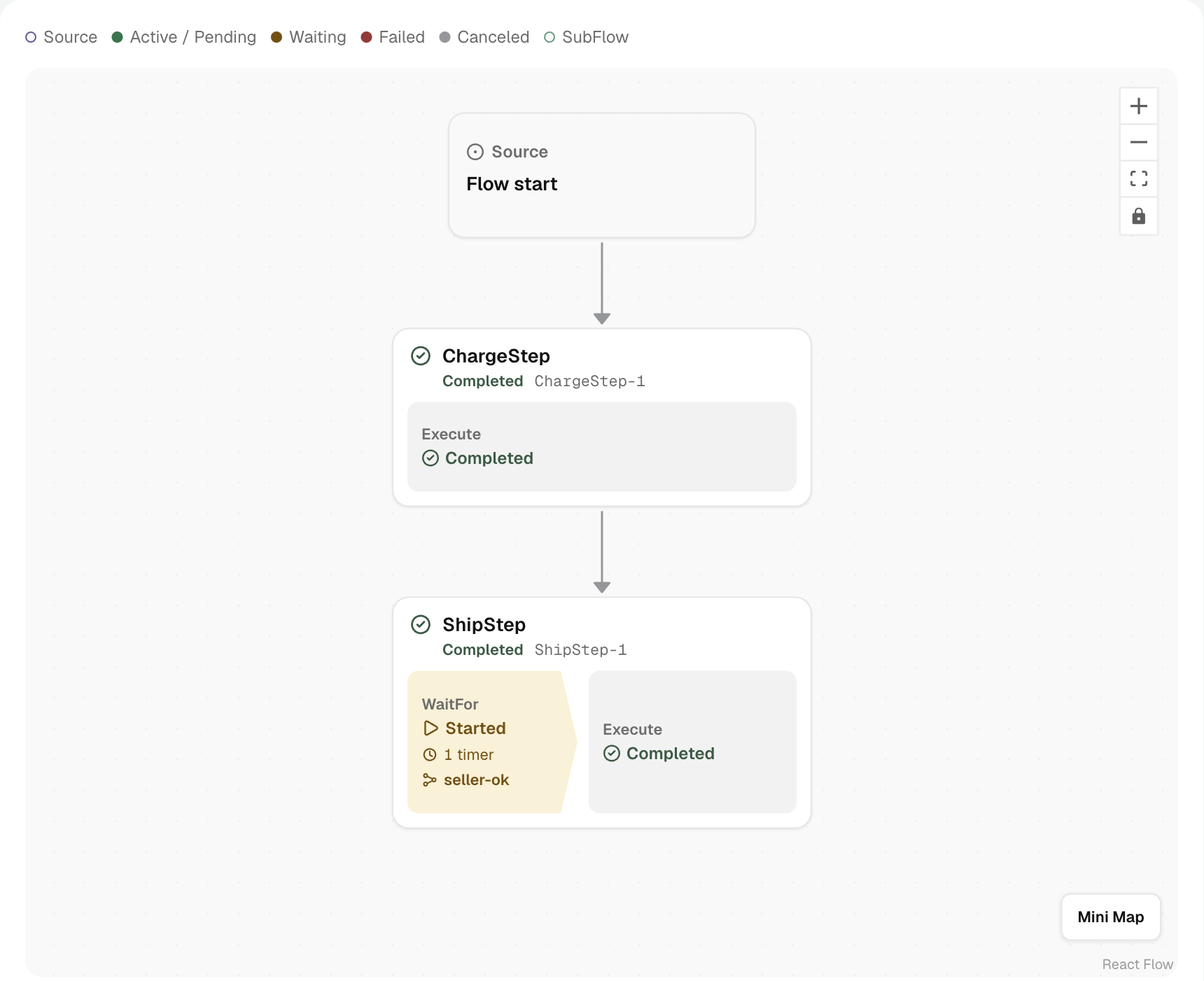
After you approve the order, open the Flow in Dex Web. The Execution graph shows Charge, then Ship:
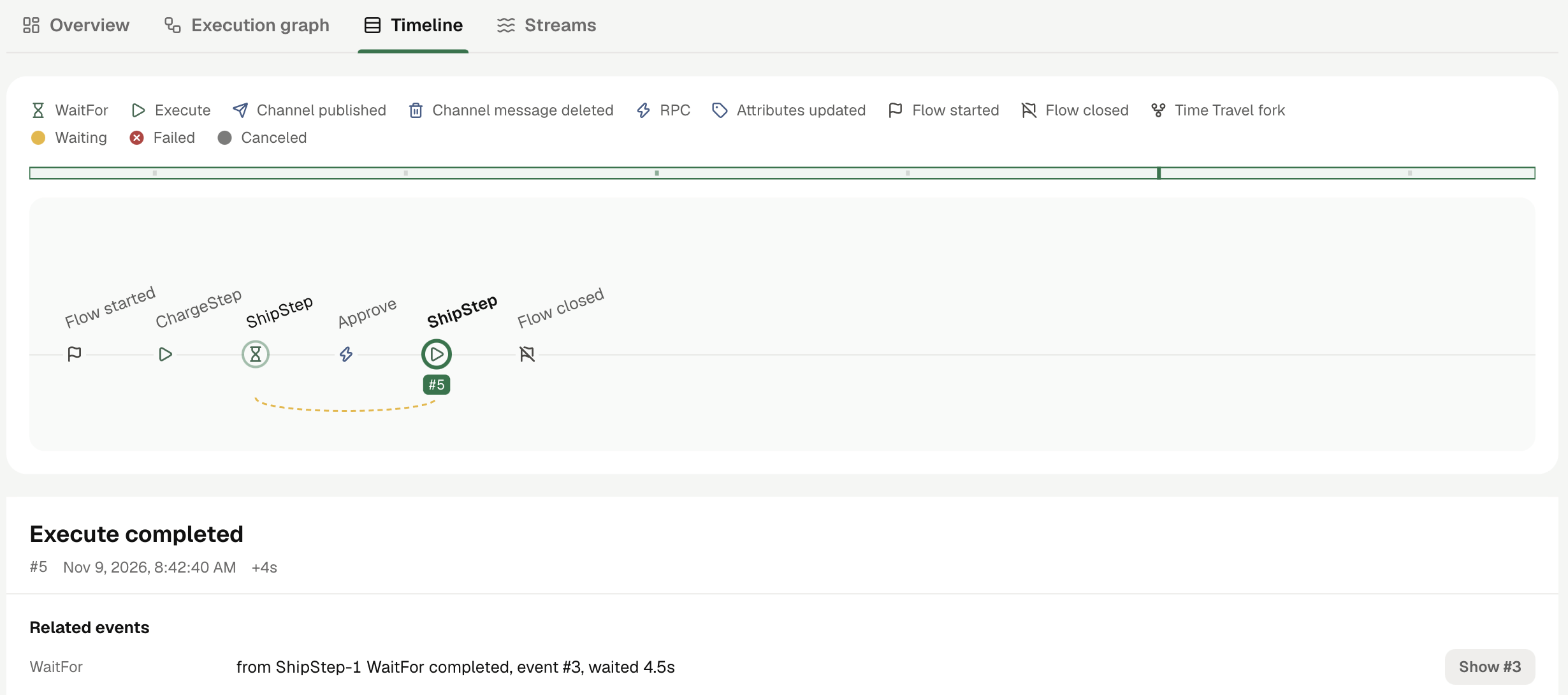
The Timeline tab shows the same run's events from left to right. Select an event to read its input and output below the Timeline:
Next
- Concepts: Flows, Steps, Channels, Timers, and the other building blocks this example uses.
- Your Application: how to add a Worker and a Client to your own service.
- Dex vs. Databases: the same order process built on a database and queues.
- Examples: more complete examples, including two AI agents.